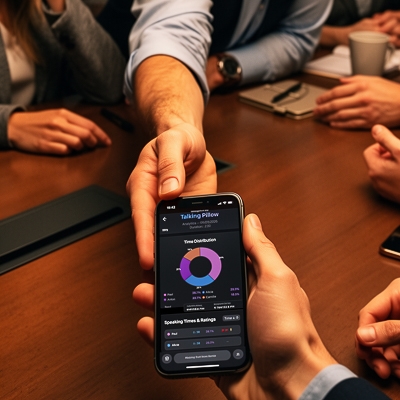
Live & Free — No signup needed

Talking Pillow

Fair Speaking Time, Made Simple.

A simple web tool that helps groups share speaking time more equally, so everyone feels heard.

Experience it now

Use the app at talkingpillow.app

No download, no signup – just open the link and start a session.

What is Talking Pillow?

Talking Pillow is a digital version of the "talking stick" or "talking pillow": only one person speaks at a time, and everyone gets a fair chance to talk.

Use it to:

  • Make meetings more balanced
  • Help children learn to listen and wait their turn
  • See who speaks a lot and who stays silent
  • Support therapists and facilitators in managing group dynamics

It runs directly in your browser and works for:

🏢 Businesses

More inclusive meetings

👨‍👩‍👧‍👦 Families

Building active listening in children

🏫 Schools

Tracking classroom participation

🧠 Therapists & Coaches

Observing who speaks, how often, and how

Ready to see it in action?

Start a session on talkingpillow.app →
Group using Talking Pillow

Origins & Inspiration

The core idea behind Talking Pillow is very old: one person speaks, everyone else listens, and the right to speak is passed around.

This is inspired by the Native American tradition of the talking stick:

  • 🪶 A special object (stick, feather, etc.) is held by the person allowed to speak.
  • 👂 Everyone else listens with attention and respect.
  • 🔄 When finished, the speaker passes the object so others can speak in turn.

Talking Pillow takes this principle and adapts it to modern groups: families, classes, teams, and therapy sessions.

Why the name "Talking Pillow"?

This tradition has been popularized in modern TV shows, where a pillow replaces the stick:

📺 Young Sheldon – S1 E22

"Vanilla Ice Cream, Gentleman Callers, and a Dinette Set" — Sheldon's mother uses a "talking pillow" at the family table: only the person holding the pillow is allowed to speak.

📺 Breaking Bad – S1 E1

"Pilot" — A similar "talking pillow" moment appears in a family scene: the pillow is used so each person can speak without being interrupted during a difficult conversation.

In both cases, the pillow is a simple way to: slow down interruptions, give each person a recognized right to speak, and structure intense or emotional discussions.

From object to app

Talking Pillow does the same thing, but digitally:

  • 👆 Instead of passing a physical pillow, you pass the turn by clicking a name.
  • 🔦 Only one person is highlighted as the current speaker.
  • ⏱️ Speaking time is clearly tracked.
  • 😊 In both modes, you can evaluate contributions with emojis and generate reports.

Our mission is to honor the spirit of these traditions: give everyone a fair chance to speak, be heard, and be respected — in meetings, classrooms, therapy groups, and at home.

You can start right now by opening talkingpillow.app →

How Talking Pillow Works

You create a session, add participants, and choose a mode.

Step 1

Setup Phase

1

Enter participant names

Up to 50 participants per session.

2

Choose your mode

Timer Mode or Observation Mode.

Setup phase of Talking Pillow
Timer Mode in Talking Pillow
Mode 1

Timer Mode

Turn-Taking with Time Tracking

📋 Rule: One person speaks at a time. Everyone else listens.

  • The current speaker is clearly highlighted on screen.
  • When they finish, they click the next person's name to "pass the pillow".
  • The app tracks individual speaking time and total session time.

You can:

  • Use preset speaking times or set your own.
  • See in real time how balanced the speaking time is.

Ideal for:

👨‍👩‍👧 Families wanting calmer, more structured conversations

🏫 Classrooms practicing respectful turn-taking

💼 Team check-ins where everyone should share briefly
Mode 2

Observation Mode

Free Discussion Tracking

📋 Rule: The group talks freely. The app observes who speaks and how.

  • A moderator clicks on the person who is speaking. (If there is no moderator, each speaker clicks their own name.)
  • Talking Pillow automatically measures speaking time for each participant.
  • No strict turns — the conversation flows naturally while the app keeps track.

When the session ends, the Analytics page gives you a full breakdown:

  • 📊 Speaking time for each participant — in seconds and as a percentage of total time
  • 🥧 A visual pie chart showing how speaking time was distributed across the group
  • 😊 All emojis collected by each participant during the session
  • 📄 An exportable PDF report (if you enter a discussion topic)

Ideal for:

💼 Teams wanting to see who dominates and who stays quiet

🏫 Teachers analyzing participation patterns

🧠 Therapists and facilitators studying group dynamics
Observation Mode in Talking Pillow
Available in Both Modes

Emoji Evaluation

Qualify contributions, not just time

😊 Why emojis?

Tracking speaking time tells you who speaks and how long. But emojis let you capture how — the quality, tone, and relevance of each contribution.

In both Timer Mode and Observation Mode, you can:

  • Assign evaluation emojis to each participant's intervention — during or after speaking.
  • Build a qualitative profile of each person's contributions over the session.

Emojis let you qualify what is being said:

👍 Positive

"Insightful", "Clear", "Helpful", "Constructive"…

⚠️ Neutral / Negative

"Off-topic", "Repetitive", "Needs clarification"…

All emoji data flows into the Analytics page:

When a session ends, the Analytics page gives you a complete picture of what happened — combining time and quality in one view:

  • ⏱️ Speaking time per participant — in seconds and as a percentage of total session time
  • 🥧 A pie chart showing speaking-time distribution across the group at a glance
  • 😊 Every emoji each participant received — so you see not just how long they spoke, but how their contributions were perceived
  • 📄 An exportable PDF report for archiving, debriefing, or supervision

📈 Analytics = Time + Emojis in one place. No switching between screens — everything is on one clear, shareable page.

💡 Example: A participant might speak for only 2 minutes out of 30 — but receive 5 "Insightful" emojis. Another might speak for 15 minutes but receive "Off-topic" flags. Emojis reveal what numbers alone can't.

Try emoji evaluation in your next session on talkingpillow.app →

Emoji evaluation in Talking Pillow

Why Equitable Speaking Time Matters

When speaking time is more balanced, conversations improve — for children, adults, and teams.

👶 For Children & Families

Research on structured turn-taking suggests that:

  • Children in more balanced conversations tend to show higher emotional intelligence.
  • Parent–child brain activity can be more synchronized when they take turns speaking and listening.
  • Clear speaking rules can reduce oppositional or challenging behaviors.

In simple terms: when everyone knows they will get a turn to speak and be heard, relationships become calmer and safer.

🧑‍💼 For Adults & Teams

In adult groups, more equitable speaking time can:

  • Improve memory and information retention
  • Reduce stress and frustration by making people feel listened to
  • Boost creativity and problem-solving in teams

Talking Pillow makes all this:

👁️

Visible

You see who speaks and for how long

📏

Measurable

Stats and charts replace vague impressions

Actionable

Emojis and reports help you adjust

See it on your own data: use it in your next family talk, class, or meeting on talkingpillow.app →

Who Uses Talking Pillow?

Businesses & Teams

🏢 Businesses & Teams

  • Run meetings where everyone contributes, not just the loudest voices.
  • Use Observation Mode to see who dominates and who rarely speaks.
  • Use emojis and reports to debrief and improve future meetings.
Families

👨‍👩‍👧‍👦 Families

  • Help children learn to wait for their turn and listen without interrupting.
  • Use Timer Mode to reduce constant talking over each other.
  • Create calmer family discussions where everyone knows they will have a chance to talk.
Schools & Educators

🏫 Schools & Educators

  • Track classroom participation during a lesson or activity.
  • Encourage quieter students to speak by giving them clear turns.
  • Use Observation Mode and emojis to reflect on the quality of participation, not just quantity.
Therapists, Coaches & Facilitators

🧠 Therapists, Coaches & Facilitators

  • Observe group dynamics objectively: who speaks, who withdraws, who responds to whom.
  • Use emoji evaluations to quickly annotate the tone or quality of interventions.
  • Export PDF reports to support supervision, case notes, or group debriefings.

Same principle everywhere:

Fair speaking time. Clear structure. Qualitative feedback with emojis. Data you can act on.

Try it in your own setting today →

Ready to Experience
Talking Pillow?

Talking Pillow is a live web app you can use right now:

✅ No installation
✅ No account required
✅ Works on desktop, tablet, or mobile

Try it once with your team, your class, your therapy group, or your family — and see how the conversation changes when everyone gets a real chance to speak, and when contributions are evaluated with simple, intuitive emojis.

Go to talkingpillow.app →